Javascript Menu by Deluxe-Menu.com
Javascript Menu

Menu Screenshots

Javascript Menu Download Javascript Menus

Features

High Performance
  • AJAX menu loading - loads web menu data from the server "on-the-fly".
  • Commonly loads quicker than other html page elements
  • UL/LI items structure
  • Runs well with an unlimited number of submenus and items
Professional Look-n-feel
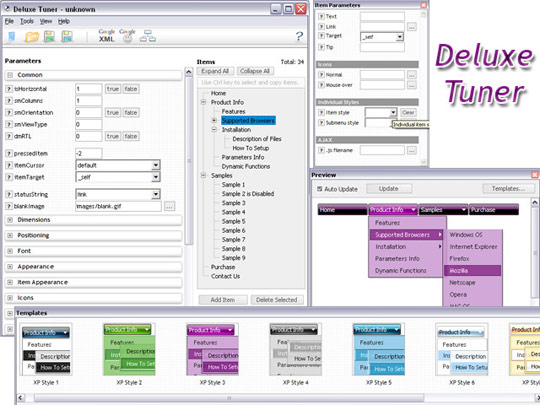
  • Entirely customizable look-n-feel
  • A lot of pre-designed javascript menu samples
  • Hundreds of visual effects
  • Custom CSS styles can be applied for all menu settings
Dhtml Sliding Frame Javascript Menu
Compatibility              
  • Full cross-browser compatibility including IE, Netscape, Mozilla, Opera, Firefox, Konqueror and Safari on Windows, Mac OS and Linux
  • Menu can be populated from a database using ASP, PHP, etc.
  • Search engine friendly
  • Support for any doctypes
  • Fits for secure sites
  • Section 508 compliant
Seamless Integration
  • Cross-frame support - menus work on frameset-based pages
  • Visible over flash, select boxes, iframes, java applets
  • Multiple menus on the same page
  • Amicable to other scripts and css styles
  • Any HTML code can be used inside menu items
Unrivalled Features
  • Scrollable, dragable, floating, right-click menus
  • Keyboard navigation - press Ctrl+F2 to enter the menu
  • Unique Java Script API for altering menu "on-the-fly", without page reloading
  • AJAX technology - loads menu data from the server "on-fly and on-demand".
  • Search feature - add the search area in the menu and type symbols. The found words will be higlighted.
  • Sound support!


2.0 Buttons by Web-Buttons.com v3.0.0

Javascript Menu. DHTML Menu.

  • Create contextual menus for your pages. For this purpose you should assign a special function for the object you want. The current coordinates of the mouse pointer or your own ones can be used for the contextual menu.
  • When the submenu is larger than the visible area of the page the submenu will be automatically decreased. To see all the submenu items you do not need to use scrollbars or something like that - just put your mouse to the bottom of a submenu and it will be automatically scrolled! You can also specify height and width for each separate submenu.
  • Build menus completely based on Cascading Style Sheets. It is possible to appoint the individual CSS styles for separate elements of the menu.

Recent Questions

Q: I just need to know if there is a way of establishing the width at "runtime" in the javascript dynamic menu so that my frame in my frameset can be widened accordingly.

A: There are no special parameters for menu dimensions.
But you can use submenu IDs. For example, top-menu has ID"dmXXXm0"

Where XXX - menu index. So, first menu on the page has ID "dm0m0".
So, you can determine menu dimensions so:

document.getElementById('dm0m0').offsetWidth
document.getElementById('dm0m0').offsetHeight

You can also use Javascript API functions to take submenu IDs.


Q: I have another question regarding the popup window. I need to use an iframe within the popup window. Is there any way I can close the onmouseover popup from the page loaded within the iframe? Something like "parent.document.getElementById('windowid').hide();". Any help would be appreciated.

A: You can close the onmouseover popup using the following function:document.getElementById('win').hide();

Unfortunately it won't work if you use iframe as window content.
You open another page in the popup (in Iframe) so you cannot accessdocument.getElementById('win').hide();
element which is situated on the first page.

When you use text or object_id as window content the content of the popup will be situatedon the same page so you can access document.getElementById('win') element and hide it.

There is a workaround.
Use text as content type and add the following code inside popup:

<a onclick="document.getElementById('win').hide();">...</a> <iframe></iframe>

Your link will work in that case.


Q: I want to set up dhtml tab on my page, and have HTML code inside the tab,
rather than have the tab be a link.
I'm having trouble figuring this out. Can you help?
In other words, when a user clicks on a tab, I want a table to display below
the tabs instead of it being a link.

A: See in Deluxe Tabs there are two modes:

1.   var tabMode=0;
You can create only one level of tabs and assign Object Id's of the
DIV's to show when you click on the tab.

["XP Tab 1","content1", "", "", "", "", "", "", "", ],
["XP Tab 2","content2", "", "", "", "", "", "", "", ],
["XP Tab 3","content3", "", "", "", "", "", "", "", ],
["XP Tab 4","content4", "", "", "", "", "", "", "", ],

2.   var tabMode=1;
You can assign only links in this mode.
You should create top level items with subitems.

["XP Tab 1","", "", "", "", "", "", "", "", ],
 ["|Link 1_1","http://deluxe-tabs.com", "", "", "", "", "0", "", "", ],
 ["|Link 1_2","testlink.htm", "", "", "", "", "0", "", "", ],
 ["|Link 1_3","testlink.htm", "", "", "", "", "0", "", "", ],
 ["|Link 1_4","testlink.htm", "", "", "", "", "0", "", "", ],
 ["|Link 1_5","testlink.htm", "", "", "", "", "0", "", "", ],
["XP Tab 2","", "", "", "", "", "", "", "", ],
 ["|Link 2_1","testlink.htm", "", "", "", "", "0", "", "", ],
 ["|Link 2_2","testlink.htm", "", "", "", "", "0", "", "", ],
 ["|Link 2_3","testlink.htm", "", "", "", "", "0", "", "", ],
 ["|Link 2_4","testlink.htm", "", "", "", "", "0", "", "", ],
 ["|Link 2_5","testlink.htm", "", "", "", "", "0", "", "", ],
["XP Tab 3","", "", "", "", "", "", "", "", ],
 ["|Link 3_1","testlink.htm", "", "", "", "", "0", "", "", ],
 ["|Link 3_2","testlink.htm", "", "", "", "", "0", "", "", ],
 ["|Link 3_3","testlink.htm", "", "", "", "", "0", "", "", ],
 ["|Link 3_4","testlink.htm", "", "", "", "", "0", "", "", ],
 ["|Link 3_5","testlink.htm", "", "", "", "", "0", "", "", ],

You can use Object ID as well as Link in both modes. Use the following prefixes within item's link field:
"object:" - means that there is object id after it;
"link:" - means that there is a link after it.
"javascript:" - means that there is a javascript code after it, for example:javascript:alert(\'Hello!\')

So, you should write for example:

 ["|Link 1_1","object:Content1_1", "", "", "", "", "0", "", "", ],


Q: I see that you have the demo of the menu working over a frame so that it displays over the lower frame, vertical top to bottom.
However I have played around with your demo and can't seem to replicate the same feature.
Could you please tell me what I have to set to make the easy dropdown menu float over the lower framed window?

A: To initialize the cross frame menu call dm_initFrame() function instead of standard dm_init() function within data.js file:

dm_initFrame(framesetID, mainFrameInd, subFrameInd, orientation);

framesetID - id attribute of the frameset;
mainFrameInd - index of the main frame (where the top-menu is placed), >=0;
subFrameInd - index of the subframe (where the submenus will be shown), >=0;
orientation - frame orientaion: 0 - top-to-bottom, 1 - left-to-right; 2 - bottom-to-top; 3 - right-to-left.

For example, for the following structure:

<frameset id="frmSet" rows="185,*">
<frame id="frame1" src="cross-frame-horizontal-1.htm">
<frame id="frame2" name="testlink.htm" scrolling="no">
</frameset>

the dm_initFrame() function call at the end of data.js file will look like:

dm_initFrame("frmSet", 0, 1, 0);